
SMS Setup
Credits
SMS credits are required to send SMS messages from the system, with each SMS using 1 credit. The account's balance is under Reports > System > SMS Credits; contact support for more credits.
System-wide Settings
Open Administration > System > SMS to configure the account's SMS notification settings.
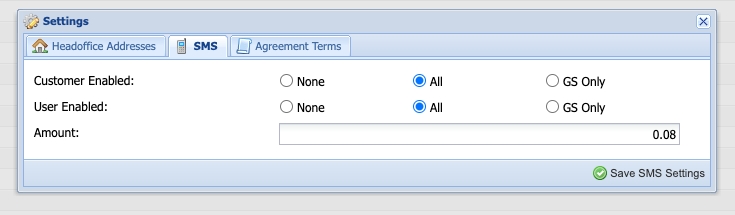
Settings control whether and how SMS notifications are sent across the system.
User Type Settings
- Customer Enabled - Yes sends SMS notifications to customers; No sends none to customers regardless of other settings
- User Enabled - Yes sends SMS notifications to users; No sends none to users regardless of other settings
Press Save to apply.
Group Scheme Settings
SMS settings can be overridden for a group scheme: open Administration > Programs > Group Schemes, open the scheme and go to its Information settings.

Configuration options include:
- Welcome Template = SMS template for the message sent when a work order is created
- Customer & User = Use system-wide settings or disable; SMS can only be turned off for a scheme, not on when the account has it off
- SMS Rate = Amount to bill the Group Scheme per SMS notification